Gonna pick up a new DVD writer

Started by DocJon · 12 posts · 1,603 views

  1. #1
    My current lite-on ldw-411s is about 5 years old. It's slow, but the real problem is that it doesn't seem to like any new media I'm buying. I picked up some Philips 16x DVD-r at Circuit City, and they produced 3 coasters in a row, so they went back. I then bought some Sony 16x DVD+r somewhere else, and the first disk from that pack was also a coaster.

    In between using these, I burned my last Verbatim 8x DVD+r from the last 5-pack I'd been using. It burned fine. I'm thinking my old burner doesn't recognize the info on the disc that tells it what to do, so it's flaking out and burning with errors. Also, the new disks would only burn at 2x or 2.4x, instead of the 4x I'd been using on the old disks.

    I found the latest firmware and upgraded my burner, but it didn't help. In fact, the last Verbatim 8x disk also burned at 2x, so I'm thinking the new firmware wasn't a good idea.

    So, I'm gonna get a new one. I've been wanting to get a SATA anyway, so I can ditch the IDE card I bought to allow this system to run more than 2 IDE drives.

    Thoughts/opinions on this one?
    http://www.newegg.com/Product/Product.aspx...N82E16827106265

    Comes with a version of Nero, all cables, and has Lightscribe, if I ever want to play with that. Free 3-day shipping, which compensates for the state tax I have to pay for ordering from Newegg.
  2. #2
    I am running that drive, it's been fine, but to be honest I think I may have only burned one disk with it since I got it. I use my thumb drive or portable HDDs for everything now.

    The nero was a simple version that I never installed after the first time.
  3. #3
    Bubbaspanky wrote:I am running that drive, it's been fine, but to be honest I think I may have only burned one disk with it since I got it. I use my thumb drive or portable HDDs for everything now.

    The nero was a simple version that I never installed after the first time.

    Not real concerned with the Nero version. I have a few already, and expect I can update if needed. Thought it might be nice to have a new copy. Dang thing keeps getting more bloated anyway. Might need to see if my current version can handle the LightScribe though. Shouldn't be a problem.

    I guess I'll pull the trigger on it. It used to be said that Lite-on's were the second best drives, and they are a whole lot cheaper than the Plextor's.
  4. #4
    Yeah most of the name brand drives are Lite-on or Plextors that are repackaged.
  5. #5
    Well, I got my order in. I went thru every cheap drive Newegg sells, looking for reviews & info. I finally went for a Pioneer DVR-216D

    http://www.newegg.com/Product/Product.aspx...N82E16827129032

    It's new, so it was hard to scrape up info on it. It's the replacement for the old 215, which seems to have been well-regarded.

    Been reading in the geek forums at CD freaks, CDRinfo, and elsewhere. Man, those guys know more about DVD burners than I ever want to know. They have drives just for burning video, another just for ripping audio, etc. One guy has 60 drives!!!!!1!!1!

    Anyway, this one should do. No Lightscribe, but at least I won't have to spend twice as much for media that might be half as good, just because it has the shiny writable top. I picked up a new set of red, blue and black sharpies to compensate. 🙂
  6. #6
    Yeah I used the light scribe once, probably never again, it takes uber long
  7. #7
    Bubbaspanky wrote:Yeah I used the light scribe once, probably never again, it takes uber long

    Pity. It looks a lot better than scrawled Sharpie, doesn't it? 🙂

    Is it faster if you do a small graphic near the hub or something, or just a plain text listing of files? I guess you wouldn't know, since you haven't played with it much, but maybe someone else does.

    If they can't reduce the time, it's never going to catch on in a big way. The burners aren't uncommon, but I get the impression that your experience isn't, either (a test run, then forget it). I've heard 20-30 minutes is the norm for a Lightscribe label burn, and that's on top of the time it takes to actually burn the data. There's just no way I was ever going to use it at that speed.
  8. #8
    Yeah I burned a CD in 4 or 5 min and 30 for the label.

  9. #9
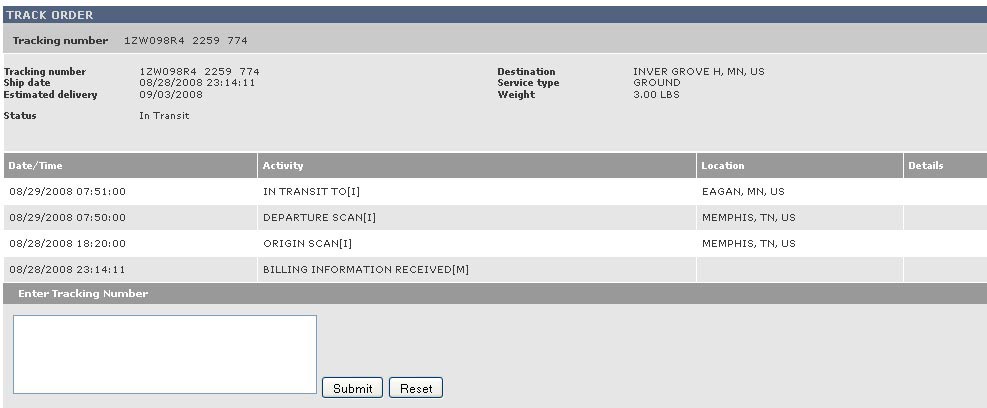
    I followed the UPS tracking link in my Newegg order confirmation, and this was the result:

    tracking2.jpg

    While looking at it, bear in mind that I LIVE in Tennessee. I was fixin' to whip out my Picard, "WTF IS THIS SHIT?" jpeg, but then I read closer. I didn't place the order on the 28th.

    This is someone else's order. A bit must have been twittled betwixt the UPS site and my link. On retrying the link, it comes up with different info more fitting to my order.

    Ahh, what the hell. . .Atomm likes it. 🙂

    Picard_WTF.jpg
  10. #10
    Weird all of my tracking has been from Top down... i.e. I bet they just have the date/time and activity column upside dfown. It start in Minn and got to TN today! Funny no less though
  11. #11
    Bubbaspanky wrote:Weird all of my tracking has been from Top down... i.e. I bet they just have the date/time and activity column upside dfown. It start in Minn and got to TN today! Funny no less though

    Well, they have a warehouse in Memphis, not in Minnesota(which is why I have to pay sales tax). Also, I'm sure it's not my order, unless they predicted it a few days before I placed it.

    It was hard for me to read, since I was expecting it to be from the top down as well. My actual order tracking info IS listed from the top down. This is messed up on a couple levels.
  12. #12
    call em and tell em, maybe they'd give you free goodie for finding the mistake