I've been having problems with my internet, primarily with my browsing, I think.
Since my last install, I started using a new firewall (Comodo) due to the high ratings it's been getting over the past year or so. I thought running Sygate (no longer being supported) wasn't as secure, so I tried Comodo. I wasn't wild about it, and since my internet seemed somewhat slower, I reverted to an early GHOST image before I installed Comodo, and put Sygate on instead. If anything, it's slower. I'm talking 30 seconds to a minute from clicking on a link to getting a page to load. Dial-up speed.
I thought it might be Firefox, so I tried IE, and it's pretty darn sluggish as well. Doing anything is an exercise in frustration. I can't tell if it's me or my cable provider. I was able to game Friday, but then again, I WAS experiencing lag and slideshow images at the end, which is what make me finally call it a night.
Trying to search the internet for info on my slow internet connection is, understandably, SLOW. The normal process of clicking, reading the link, and then going back when it turns out to not be helpful is painful, and it might take me a few days to find anything at this rate!
I'm running XP pro, with SP1 & SP2 slipstreamed into the install disk. I'm using the built-in NIC that's on my Intel 865 PERL motherboard(which seems to be installed coreectly in Device Manager). I disabled the Firefox extensions. I was running COMODO firewall, but reverted to a pre-Comodo image and installed Sygate (I'd heard a lot about ppl not able to get Comodo uninstalled completely). I had the modem unplugged (power cord) for long periods today, as I was working without a firewall a lot. No antivirus yet - relatively little installed beyond drivers and some basic utilities. I'm using the cable modem Charter supplied, no routers, no wireless, and I'm not networked to any other computers.
I've not been wild about my internet browsing speed the past week or so, but it's worse since I reverted to the early pre-comodo image and switched to Sygate. I used Sygate very successfully for months previously, and I'd like to keep it if I can, as Comodo wasn't working out great for me.
Anyone have any ideas before I call my ISP? I'd like to be sure of everything I can be on my end before calling them.
Just real fast advice, do a ctrl-alt-del and run task manager. Sort by CPU putting the highest at the top. See if there is a rouge process running that may be taking up all of your CPU usage.
The system idle process is the only one that should be very high, over 80% most of the time unless you are gaming or doing something else.
EDIT More:...
I never actually got around to testing Comodo but also heard good things about it. I was going to try it at some point but Sygate and Zone Alarm work so well I just never did 🙂
Sygate still works very well for me and I like it the best so far for a more controlled firewall. It runs on older NT systems and servers as well as XP and Vista. I like that it ran on Vista which I did not think it would at all 🙂
Since a firewall basically blocks any processes you do not want to allow, I think it works great as is. Sygate allows the rule set which is very handy. I use Sygate on my servers at work and never had a problem with it yet.
Symantic bought Sygate so I am unsure if they will simply dump it and push their own or use and build upon the great engine that Sygate was. The latter is what they SHOULD do if they were smart. But we all know companies always do the smart thing right? 😉
Of course the free zone alarm still seems to work fine... so far... it is just not as configurable for allowing certain ports etc... the pro ones does that and I do not like the pro one.
From there, you want to methodically track how things are working and document them. For word of advice, do not use websites that are high usage for your tracking. They are either set up in multiple locations or are using a caching provider. These sites would include Yahoo, Google, etc.
Pick 3-4 websites that are on different networks across the country. Gamers Radio might be a good choice. It is hosted in Virginia.
You can also try this with your DNS servers first as they play an important part of web browsing. I've seen bad DNS cause all sorts of problems.
1. Pull them up in FF first. Time them. 2. Then pull them up in IE and time them. 3. Next, ping them and note the times and any dropped packets. ping -t 100 www.hostname.com (You want the numbers to be very consistent.) 4. Next, do a traceroute to each and note the times and dropped packets. 5. The last thing you want to do is called a pathping. It's the mother of pings and traceroutes. Here is the command you should use.
pathping -q 100 www.hostname.com
This will take a bit, so don't do anything else while it's running.
6. After you do the pathping, you want to run it one more time with a different set of switches.
pathping -n -q 100 www.dreamhost.com
This will run pathping again without looking up the hops along the way. If you see a drastic improvement here, then your problem may be your DNS is slow. Change your DNS.
Some things to consider. Dropped packets do not always mean a problem. Some routers are told to drop these packets without responding. If you see spikes on routers that have gw on them or if the next hop is a totally different ISP, then that usually means the peer connection is receiving a heavy amount of traffic.
If the problem is on a network outside your ISP, there is nothing you can do about it. If you see problems on your ISP's network, then call them.
If you see high spikes on the first hop, then there is a chance that your nic is bad.
Also, I would highly recommend getting a router between you and the public internet.
Might be worth booting with a linux distro live cd and seeing if things run better there too. I know Ubuntu live CD tends to get your NIC card running on machiens I have tried it on. Might be an easy way to determine if it's in fact hardware/ISP or OS
Beyond that try what Atomm suggested. I woudl also try it with the software firewall and Virus scan disabled. Those are two bottlenecks, if one of them is too bloated or misbehaving it's an obvious source or lack of speed
Personally I would just restore from that original Ghost image and try to track down the problem. If you JUST re-installed fresh your internet should be fine unless something went astray right away. I think you are waisting your time re-installing AGAIN.
Do it this way, create a GHOST image of the current re-install (you should have done that before you just re-installed yet again) then restore to that previous one. You can always go back easily with GHOST. GHOST lets you do this.
Check your DMA HD settings as well etc...
Personally I would bet that it is your cable provider having problems or it could be your cable modem itself. You do not have a router as far as I know.
See if you can get a new cable modem and see if that helps. When the network is flaky it can make the entire machine seem all F*&@ed up and slow even though there is nothing wrong with it.
Thanks everyone. It looks like I had a virus and/or a trojan. It was probably in one of the first pieces of software I installed, so all my old images are now erased, as well as all HD's that had any software installed on it in any previous install. I found 2 instances of the same virus, and 2 instances of a trojan in 4 dl'ed programs, 3 of which I'd installed.
I used Netstat and it came up with 19 internet connections. Nothing was making itself obvious in the Performance tab of Windows Task Manager, however. No CPU hogs, just slow internet.
In Netstat, I had 4 or 5 TCP connections, and the rest were UDP. I was trying to post a pic of this in my earlier post, but I never did get to finish the post, as my computer never finished the 23k upload. I was surprised to come back and see it posted at all. I gotta run a whole system scan once in awhile, instead of relying on real-time protection only. If I'd done that, I would've caught those infections before my first format/reinstall, and they never would've been introduced in the new install.
Anyway, things seem OK now. I hope I got 'em all this time.
DocJon wrote: Thanks everyone. It looks like I had a virus and/or a trojan. It was probably in one of the first pieces of software I installed, so all my old images are now erased, as well as all HD's that had any software installed on it in any previous install. I found 2 instances of the same virus, and 2 instances of a trojan in 4 dl'ed programs, 3 of which I'd installed.
I used Netstat and it came up with 19 internet connections. Nothing was making itself obvious in the Performance tab of Windows Task Manager, however. No CPU hogs, just slow internet.
In Netstat, I had 4 or 5 TCP connections, and the rest were UDP. I was trying to post a pic of this in my earlier post, but I never did get to finish the post, as my computer never finished the 23k upload. I was surprised to come back and see it posted at all. I gotta run a whole system scan once in awhile, instead of relying on real-time protection only. If I'd done that, I would've caught those infections before my first format/reinstall, and they never would've been introduced in the new install.
Anyway, things seem OK now. I hope I got 'em all this time.
Thanks.
Next time just call me so I can run through some things. My very first thought was a Trojan but since I know you and the precautions you take, thought hat was unlikely on your machine.
You should not have erased your images either. Did I mention for you to CALL ME! I could have got you a copy of that Bart CD or equal. You boot of the CD and since it is not in windows, it allows you to scan and catch a lot of things you otherwise would not. You could have restored your old image and just scanned and removed the damn thing. 😉
Netstat is a good utility for this, good job on that one. I should have mentioned trying that, sorry.
Real time protection should have caught the bad .exe file to begin with.
I am VERY cautious when installing anything I am unsure of these days as I am sure you are. S-happens...
Paladin wrote: Next time just call me so I can run through some things. My very first thought was a Trojan but since I know you and the precautions you take, thought hat was unlikely on your machine.
You should not have erased your images either. Did I mention for you to CALL ME! I could have got you a copy of that Bart CD or equal. You boot of the CD and since it is not in windows, it allows you to scan and catch a lot of things you otherwise would not. You could have restored your old image and just scanned and removed the damn thing. 😉
Netstat is a good utility for this, good job on that one. I should have mentioned trying that, sorry.
Real time protection should have caught the bad .exe file to begin with.
I am VERY cautious when installing anything I am unsure of these days as I am sure you are. S-happens...
Did I mention CALL ME! 😉
Thanks man, but nothing kills like overkill 🙂 It's clean now, and I'll make a clean image with just the essentials for future use.
More internet problems. WAY too many connections in Netstat.
Dunno why. I was very careful about viruses, and I eliminated suspect files from this install and deleted them. Formatted the C: drive from WinXP install disk. Formatted another partition the same way. No programs were left on the HD from last install.
Won't be in FNF unless I get this straightened out quickly, just so you know.
I'd post some screen caps, but it took forever to get this far, and a 23k upload failed last time I went thru this, so I'm not even trying this time.
DocJon wrote: More internet problems. WAY too many connections in Netstat.
Dunno why. I was very careful about viruses, and I eliminated suspect files from this install and deleted them. Formatted the C: drive from WinXP install disk. Formatted another partition the same way. No programs were left on the HD from last install.
Won't be in FNF unless I get this straightened out quickly, just so you know.
I'd post some screen caps, but it took forever to get this far, and a 23k upload failed last time I went thru this, so I'm not even trying this time.
I'd bet even money you have a bad harddrive. Its working just enough to install stuff to, but lags out whenever you put any real load on it.
This was the prob with my kids computer last week. I cloned the old one with a new HD. It ran sweet with no slowdowns or internet delays from the first boot. Then I later removed some trojans and virus' from the new copy.
lexx wrote: I'd bet even money you have a bad harddrive. Its working just enough to install stuff to, but lags out whenever you put any real load on it.
This was the prob with my kids computer last week. I cloned the old one with a new HD. It ran sweet with no slowdowns or internet delays from the first boot. Then I later removed some trojans and virus' from the new copy.
A HD problem that only shows up when using the internet? I know better than to discount ANYTHING anymore, but I'm not gonna put that at the front of the list just yet.
I uninstalled SANDBOXIE, a util used to isolate programs from putting things on your HD, for trying them out and for safe internet surfing. I wasn't even using it, but I think it was having an effect on my system - interesting, in that I'd had it installed for the past six months without a problem. Maybe the upgrade I DL'ed had a change my system doesn't like. Anyway, I booted to safe mode, and uninstalled it. seems to acting alot faster now.
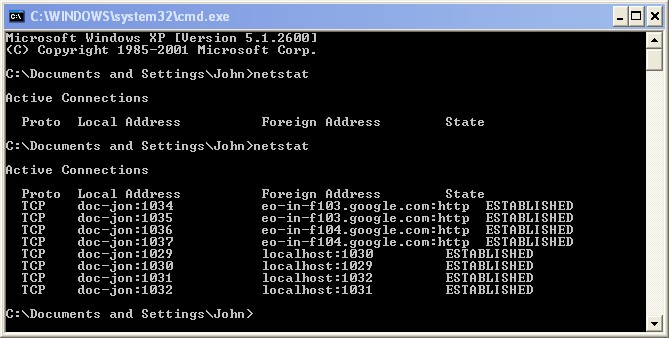
I installed Comodo Boclean as another level of protection for awhile, and did another system scan with my AVG antivirus. Rebooted to safe mode and did ANOTHER AV scan. Here's what netstat is telling me now:
I Googled the eo-in-f103 thing, not much definitive info there. The same for eo-in-f104. . .
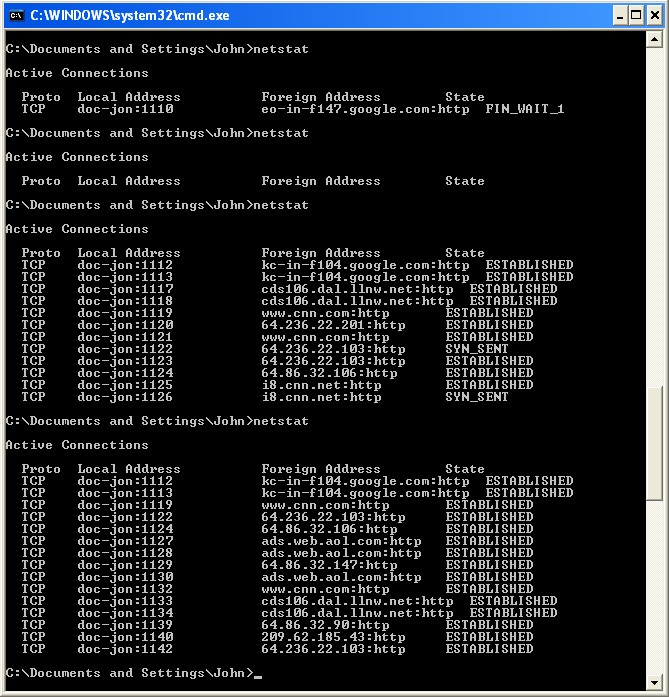
Here's what it said before, when i posted my last msg.
I don't know what to make of it all, but my system is accessing the net faster.
One thing I can tell you is all of those processes are HTTP. Usually, if someone hijacks your system, they use a different protocol or port than HTTP/80/443. None of those would concern me.
It's when you start seeing strange port numbers that are in the private range, IE anyone can use them for anything, or if they match up to things like IRC, that I would start to worry.
ftp port (21) is also a concern, but probably not so much anymore. What you are seeing here is stacks of Ad servers. CNN is bad for that. Remember on a page you can see entries for the page and the ad-servers that serve ads to the page.
close out all software and run a netstat then open to cnn.com and run a netstat... it'll blow your mind
Atomm wrote: One thing I can tell you is all of those processes are HTTP. Usually, if someone hijacks your system, they use a different protocol or port than HTTP/80/443. None of those would concern me.
It's when you start seeing strange port numbers that are in the private range, IE anyone can use them for anything, or if they match up to things like IRC, that I would start to worry.
I agree and with Atomm. With ZoneAlarm or any firewall that blocks outgoing processes, you should be good in bloking anything weird unless you gave a rogue program access which I know you would not. This is why I am not a fan of the built in firewall, it is incoming only blocking. you HAVE to have something monitoring anything trying to get out.
It just looked like you had a bunch of tabs open when you ran that netstat as those were just web site connections that Firefox had open.
I HIGHLY recommend using the NoScript FF plugin regardless as it will help prevent any weird scripts from installing trojans etc...
I'll look into noscript when I renistall Firefox. I uninstalled it because it was havng issues yesterday, but IE wasn't. I'm gonna clean it out and co a fresh install today.
I have someone coming Tuesday to look at my internet issues. I was overly cautious for weeks, with multiple format/reinstalls and system backups/restores. and I'm still having issues. While it's true I had a virus/trojan at one point, I don't believe this to be the case currently. I'm betting the cheap, off-brand modems the cable company supplies is to blame.
DocJon wrote: I have someone coming Tuesday to look at my internet issues. I was overly cautious for weeks, with multiple format/reinstalls and system backups/restores. and I'm still having issues. While it's true I had a virus/trojan at one point, I don't believe this to be the case currently. I'm betting the cheap, off-brand modems the cable company supplies is to blame.
I'd ask if you have tried pinging your tracerouts, but you seem to be having problems with websites. Hows the gaming pings been for you lately??
Of course, pinging some game servers would narrow down if there are any bad gateways in your area.
lexx wrote: I'd ask if you have tried pinging your tracerouts, but you seem to be having problems with websites. Hows the gaming pings been for you lately??
Of course, pinging some game servers would narrow down if there are any bad gateways in your area.
I've been doing a lot of formats/reinstalls/restore from image lately. I reinstalled BF2 at some point, but it didn't last long. The only games I have installed at this point are some of my STEAM games. I'm not playing what everyone else is playing anyway, so didn't see the need to rush it. If/when I get this current issue fixed, I'll try to get BF2 and some of the mods put back on, along with the UT3 demo.
Well, a month after my internet issues started, I think it's finally fixed. BAD MODEM.
The cable guy that dropped by today tweaked the outside lines as well for a stronger signal.
I went from having a 9 to 59 kbps upload speed to a 425 kbps upload speed.
The next damn time I have an issue, I just might switch to DSL instead of dealing with these guys again. It's going to be available here at the end of December.
I have been having internet issues for the last month as well. Between 8-10 at night my internet starts slowing down to the point where it eventually loses all signal within about an hour of slowing down. And all the digital channels on my TV mess up as well.... I'm seriously thinking about blowing up their office here. It has been a fight all month. The came out on Wed. and looked around and said "Oh, everything on the house is good. I will have to schedule maintenence to come out and put a monitor on your line." I wanted to strangle him. I have been telling them that the whole time, it's NOT IN THE HOUSE.
So, anyway, I'm looking at going with DSL too. They have a plan that is a whole Meg faster on the DL speed than what I have now. (when I have any speed..... GRRRRRRRRRRRRRRRR 😈 ) And it's cheaper too. I'm really really done with my cable company and there's only one other here to choose from and I hate them too. =(
sindy wrote: I have been having internet issues for the last month as well. Between 8-10 at night my internet starts slowing down to the point where it eventually loses all signal within about an hour of slowing down. And all the digital channels on my TV mess up as well.... I'm seriously thinking about blowing up their office here. It has been a fight all month. The came out on Wed. and looked around and said "Oh, everything on the house is good. I will have to schedule maintenence to come out and put a monitor on your line." I wanted to strangle him. I have been telling them that the whole time, it's NOT IN THE HOUSE.
So, anyway, I'm looking at going with DSL too. They have a plan that is a whole Meg faster on the DL speed than what I have now. (when I have any speed..... GRRRRRRRRRRRRRRRR 😈 ) And it's cheaper too. I'm really really done with my cable company and there's only one other here to choose from and I hate them too. =(
I feel your pain. This is very much similar to what I've been going thru.
The cable here, when it works, works very well. My internet is BLAZING right now. It's not as fast as FIOS certainly, but then what else is?
I was looking at the DSL plans they're offering here at the end of December. The one for $42.95 looks interesting-512 kb upload, 6 mb download. I pay that now for similar service, but that includes modem rental.
I pay more than that. I pay over $50 for internet alone, and I own the modem. The one I'm looking at is with ATT for 6.0 down and 768 up only 34.99 a month, but u purchase the modem. But that's not bad because it comes with a $50 mail in rebate. It really hacks me off that you can't get a decent upload speed around here. I will be switching cable too, because I'm just really sick of my cable company here, they have proven that my business means exactly dick to them. So, I will switch to ATT where my business will still mean exactly dick, but I will feel better about it. And with ATT the cable will be through Dish and they have a wider variety of channels including some that I haven't been able to get with cable. ( 😉 )
sindy wrote: It really hacks me off that you can't get a decent upload speed around here. I will be switching cable too, because I'm just really sick of my cable company here, they have proven that my business means exactly dick to them. So, I will switch to ATT where my business will still mean exactly dick, but I will feel better about it.
heheheh, you're starting to sound like me, or else I sound like you. Well said. 😀
If it makes you feel better, you've got more internet and cable television choices than I do, which really surprises me. I live 45 minutes from Nashville and 30 minutes from Fort Campbell, KY. You live in the freakin' desert! 😉
Starting at the end of December, at least I'll have a 2nd high-speed Internet option. I'll still have only one television provider besides rabbit ears.
We aren't 37th on the list of the most wired country for nothing you know!!!!
Wait, didn't we invent this Interweb thingy? What the hell happened.
I'm ditching AT&T. Keep in mind, you can only get the 768k/6MB if you are in the closest range. I had to settle for 640K/ Up To 3MB down for $25 and it sucks. I'm seriously considering TimeWarner and that sucks even worse.
Oh Fios, how I wish I was 4 miles south of here......
Atomm wrote: We aren't 37th on the list of the most wired country for nothing you know!!!!
Wait, didn't we invent this Interweb thingy? What the hell happened.
I'm ditching AT&T. Keep in mind, you can only get the 768k/6MB if you are in the closest range. I had to settle for 640K/ Up To 3MB down for $25 and it sucks. I'm seriously considering TimeWarner and that sucks even worse. Oh Fios, how I wish I was 4 miles south of here......
Dammit, that blows, Atomm.
Ever since I worked for ATT, I figured 2 things worked against the USA when it comes to wiring the country for the latest/greatest tech:
This combines to mean we adopt tech early, and it takes us forever, and a fortune, to upgrade.
In the case of wiring the country for Internet/cell phone use, it would be nice to be flat and half the size of Texas, like many European countries. You gotta take the minuses along with the pluses, unfortunately.
DocJon wrote: This combines to mean we adopt tech early, and it takes us forever, and a fortune, to upgrade.
Don't forget to take into account all the politicians that have to be greased in this country. For years every township around Pgh had cable, but not us. Only until Warner came in with enough money did council approve the laying of wire.
Same thing with Fios now. Paladin's had it for about a year already. It will probably take another 10 years for Verizon to save up enough to pay the necessary bribes.
Honestly with things like FIOS, it's uber expensive to lay the fiber, verizon expects a loss for a long time when they lay it, so they
1.) need to be careful they aren't laying it too quickly for when a new technology comes that everyone needs they have the fiber paid off 2.) need to ensure there are enough people in a dense enough area that they can make their money eventually.
Atomm, I'm assuming that I live in a close enough range becuz that's what they signed me up for. Also, Midland is only about 100,000 and most ppl here are on cable I would think. And actually I'm to the point where I really don't care. The cable company has pissed me off to the point where if I had any knowledge of homemade destructive devices I could think about putting them to use.
Anyway, I'll be testing it out on Wed. So, we'll see what happens then... *crosses fingers*
Well, I placed my Road Runner Internet order. I got $30 for 6 months and a $50 rebate. It's 384/5000. I'd prefer a faster upload, but my 640 upload on SBC is only hitting about 400K and the constant drops are a pain.
I'm going to compare the two and see how it looks.
are we all looking for a change at the same time? My Charter cable company just saved themselves 3-6 months due to 'deal' prices. Though there is now a second Comcast that just moved in and is giving all the cheap discounts.. just opened up for my area,.
Then there is DSL which is a faster speed but I cannot tell how far the nearest substation is, I know there are two large substations 10 and 14 miles down the road but still.. it is a distance thing with DSL.
And remember the distance isn't how the crow flies it's as they ran the copper. I have seen instances where people are well within the radius and yet too far via the copper.
When I had charter, despite their cable sucking they were the best ISP ever, cheap and fast, but again as always it's different everywhere.
Anything over 4 miles is a no go. 2 Miles is about as far as SBC wants to install it, even though you can use it further. Also, keep in mind, they did extend the substations out into the neighbors via Fiber. In some cases, that is all that matters.
At our first house, I measured out at 10 Line Feet from the DSLAM. It was in the yard behind my house. It was awesome. I also got 52,666 and even 53,000 with Dial back then. That was clean.
All I know is I am going to seriously look hard in the FIOS areas when we are able to get another house.