It's minor, but it's inexplicable, and repeatable, so I thought I'd consult my on-line storage (AKA, you guys) and pick your brains.
Every time my computer boots, this pops up:
I don't know why. I believe this dates back to Sunday night. There was a build-up of ice on the power lines during a freezing rain, which caused about 12 hours of random power outages and mysterious "BOOMS" somewhere outside within earshot. I turned the computer off, but the first one got me when I was using it.
It's weird for a few reasons. One: It's the same damn folder, twice. Two: I never use that "Folders" button. Three: I don't know why this happens every reboot, and I want it to stop, please.
That almost seems like a tweak setting that's got a bit changed. Do you have any utilities that will allow you to turn on/off startup programs and services? I use WinOptimizer 4.
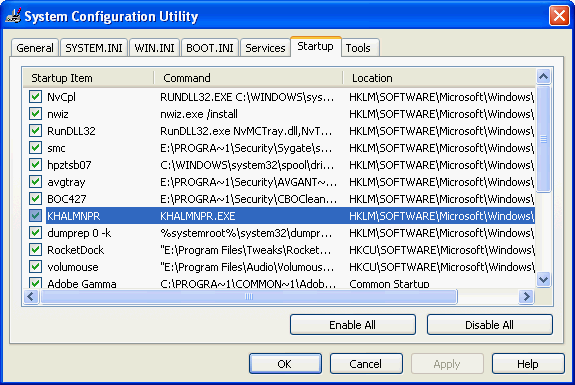
Otherwise, use the run command and try msconfig, or you could try restoring a registry point from a few days before.
saintchism wrote:And.... did you get rid of that frigging issue, Doc?
Nah, I tried the usual suspects. I think it might be rooted in the registry 🙁
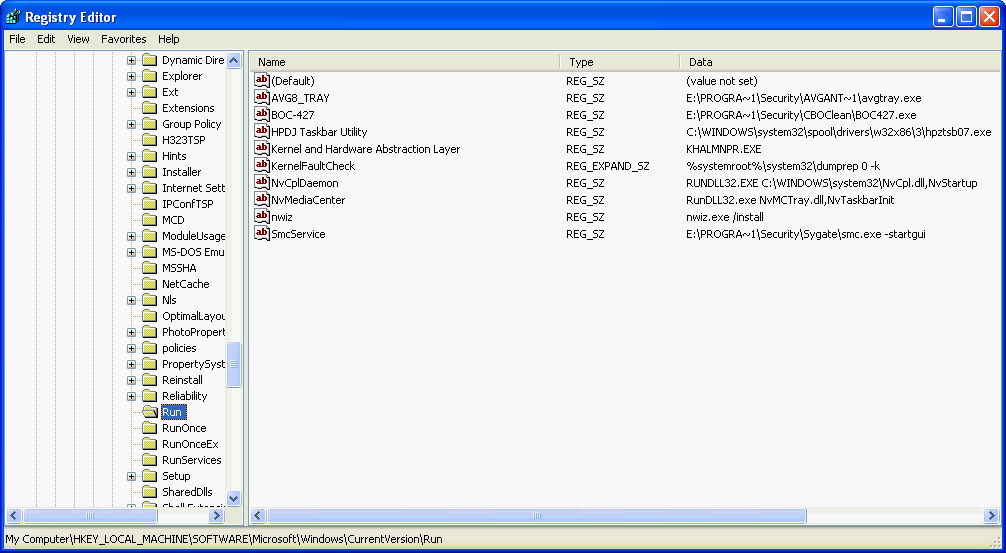
I found some folks who have had similar issues. I even found someone that had the EXACT SAME issue - but when I went to fix the registry issues that caused their problem, I found that mine already had the correct settings.
I'm letting it go for awhile, then I'll come back to it with a fresh outlook.
And yeah Sarge, Saint's fitting in a little TOO well 🙂
Paladin wrote:FWIW I still use System restore and will continue to do so. It works and has helped me at times.
Yah, with 4 comps in this house, its saved me several times. I just leave it at the default setting of what, 5% storage. Keeps about 2 weeks worth of restore points. I've also had it fail more than once, but its worth it to keep.
I'll check out that link, thanks Pal. Also have you tried using Revo to take a look at whats installed? I just love Revo uninstaller 🙂
TECHNET helped me too with the rootkit issue. At least I read it. But then I really think it is more for tech folk. For them it makes a great place to find professional advise.
So that now give me clue why I received that viagra spam.
But reallly, I take it as a compliment of you, Sarge and I think there is nothing wrong with it.
And Doc: I don´t know what you mean by TOO well. Honestly.
Well, I think many groups of friends might tell you, in a joking manner, that fitting in with their group isn't a good thing - like maybe you should try to be part of something a little better. Or, like with this group, we might tell you out of earnestness 😉
That entire Sysinternals suite from MS has lots of little gems in it. I had that already installed and didn't realize it so I'm glad you pointed it out 😀
It makes me realize how desperately I need to do a reformat and install though 🙁
Other ppl have had this problem, but the common solution for it did not apply in my case. Usually, ppl would go into RegEdit and edit a line or 2, and their problem would be fixed. Unfortunately, when I ran RegEdit, the registry was already as it should be. This fixed helped a lot of ppl though, so everywhere I looked, ppl were asking for help, the reg fix was suggested, and the problem was solved. It made it hard to find other possible fixes.
I ran into a post saying that a trojan sometimes caused this, so I looked for this. Nope, don't have it.
I poked around with the Autoruns program, but didn't find anything unusual.
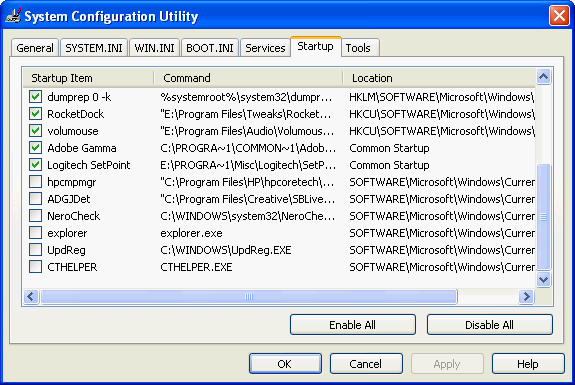
Finally, I found a post where someone suggested disabling EXPLORER in the Startup tab in MSconfig. So I did, and then rebooted. Now, instead of TWO "My Documents" folders opening on startup, I just had one. Hey, progress! So I looked in MSconfig again. Hmmm, I don't see where I disabled Explorer, and I see another Explorer entry. Weird. I KNOW I changed it, because the window that notifies you that you've made changes to your startup appeared when I rebooted. So I disabled Explorer AGAIN, and rebooted. This time, NO "MY DOCUMENTS" windows!!!!!!!!! I checked MSconfig, and I find the Explorer option unchecked this time, and no other Explorer entries to disable. 🎉
Bubbaspanky wrote:Seemingly too obvious. Why was it there though is the question, that is odd. Just FYI, the reg key I posted is the same as startup tab in MSconfig.
I couldn't tell you why it's there, except that this started immediately after a power outage. Why things would get screwed up by a power outage IN THIS WAY is yet another page in the 26 volume set entitled, "WTF just happened to my computer? I fixed it and I still don't know why that happened!"
I'm much more used to using msconfig than editing the registry. . .and I have much more showing up in the Startup tab than what is shown in the key you listed.
Atomm wrote:Our little Doc is all grown up now..... :sniff:
I remember when you couldn't tell your msconfig from you boot.ini..... 😛
My problem is that I have one system. I don't have a few that I have to keep running and modifying. When I need to know something, I Google it, and then I do it. I set it, I run Erunt, and I make a Ghost backup. With no repetition, the knowledge falls into the circular file. Every few years, I have to relearn exactly how to do the same shit over again. It's like a long-term Groundhog Day, only Bill Murray got to keep what he learned 🙂
The great thing about talking about this stuff here is that it helps my retention - and it give me something to Google when I have the same problem 2 years from now. 😀
Welcome to my world. I always wanted to get into the computer field since I was young. 14, 15....
I have worked in the computer field since 86 professionally. I was about 21. I started as a Computer Operator at a hospital's data processing department.
Now I am so burned out with this type of SH&^ that I would give anything to just do computers as a hobby. I am so sick of dealing with this type of weird, "I have no fracking idea why it is dong that" crap times 100 computers!!!!
A running joke around here is "make box work!" My users have no idea all the crap involved and that is all they want.... I guess that is to be expected but it does not make it easy at times.
No wonder I get moody and just sick of things..... I really need a change in my life but this is all I know how to do that can earn me a good living...
Hell I am not REALLY complaining though. At least I am still working....
EDIT: Sorry guys. I was having a bad day and was just venting 🙂