How to pick good passwords

Started by Sarge · 7 posts · 1,289 views

  1. #1
    Very interesting article by a noted web security expert on how to choose better passwords. The article isn't too long so read it 😀

    Bruce Schneier wrote:So if you want your password to be hard to guess, you should choose something not on any of the root or appendage lists. You should mix upper and lowercase in the middle of your root. You should add numbers and symbols in the middle of your root, not as common substitutions. Or drop your appendage in the middle of your root. Or use two roots with an appendage in the middle.

    Even something lower down on PRTK's dictionary list -- the seven-character phonetic pattern dictionary -- together with an uncommon appendage, is not going to be guessed. Neither is a password made up of the first letters of a sentence, especially if you throw numbers and symbols in the mix. And yes, these passwords are going to be hard to remember, which is why you should use a program like the free and open-source Password Safe to store them all in. (PRTK can test only 900 Password Safe 3.0 passwords per second.)


    http://www.wired.com/news/columns/1,72458-0.html
  2. #2
    is that why your password is "1_<3_@t0mm"... seems to have no rhyme or reason, not sure how you remember it
  3. #3
    You're still angry about me knifing you so much on FNF this week aren't you.
  4. #4
    Sarge wrote:
    Very interesting article by a noted web security expert on how to choose better passwords. The article isn't too long so read it 😀
    So if you want your password to be hard to guess, you should choose something not on any of the root or appendage lists
    http://www.wired.com/news/columns/1,72458-0.html


    HEH HEHE he said root....
  5. #5
    Sarge wrote:
    You're still angry about me knifing you so much on FNF this week aren't you.


    He is... he told me so... And he also told me that he was jealous and had to change his password becuz his was the same as yours... I think you 2 may need to hug it out!
  6. #6
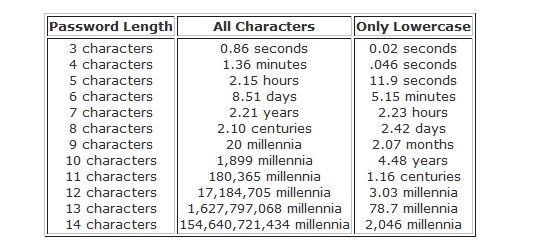
    Another argument for better passwords.

    One Man's Blog wrote:Pay particular attention to the difference between using only lowercase characters and using all possible characters (uppercase, lowercase, and special characters - like @#$%^&*). Adding just one capital letter and one asterisk would change the processing time for an 8 character password from 2.4 days to 2.1 centuries.

    password.JPG

    Remember, these are just for an average computer, and these assume you aren’t using any word in the dictionary. If Google put their computer to work on it they’d finish about 1,000 times faster.


    Full article here:

    http://onemansblog.com/2007/03/26/how-id-h...weak-passwords/
  7. #7
    I don't mind using tough passwords. My problem is when I have to change that password every 60 days. It gets to the point where I can't even keep up with the password.