I was just posting about how my pc has a 7 year old version of XP installed on it. Well, I think one of the registry hives is corrupt. I've fixed the same "system" problem multiple times, multiple ways and after a couple of hours it craps out again. It may be a hardware issue, but seems strange that it would happen weeks after I upgraded. I'm going to reseat the chip and change the heatsink to a larger one. Reseat the memory and see what happens.
(I've already run a scan for viruses and spyware, disabled the system restore points, upgraded the Bios and set the bios back to defaults)
I would refrain from SP3, I have read alot of issues. Not many of them seem to have any substantial claim of what happened, but I would give it a few more days and see what the buzz is. I have it on a test machine, but haven't had enough time to see any issues . I will have some time in the machine this weekened and next week.
Atomm wrote:It broke our app. Uninstalling via Control Panel did not restore functionality.
I'll send that link to my boss to test. 😈
Man, I'll have to get that for my own PC at home. BTW, will it clean up crap from stuff you have already uninstalled, but may be floating out there?
<--= Confused
What broke your app? Service Pack 3 or the uninstaller? What's your app?
If it was the 3rd party uninstaller, you were supposed to wait until Judge tried it! 🙂
I haven't yet tried the uninstaller. Just found it about the same time I was reading about Judge's woes, and figured it might be relevant. I'll look for more info on it. I'm not sure how it works, but it looks like it has some advanced features that you need to have a clue about or it will get you into trouble. This looks like a perfect occasion to use Erunt - BEFORE you run the uninstaller, just to be safe.
The company I work for now is a health care applications developer, ER to be specific. Service Pack 3 caused our application to stop working. Uninstalling SP3 after installing did not correct whatever was breaking our application.
If any of our clients install SP3, it will be a support nightmare, so I thought that link might be a good option to try to rollback SP3 in case a customer tries to install before we have a chance to find the problem and fix it.
Would you believe that in my head, I already said this, even though I can clearly see I did not. 😛
BTW, can you rollback SP3? Does it actually go back to before SP3 or does it work like uninstalling?
I've had every computer here want to d/l and install SP3. I didn't think it would be on the automatic windows update. I'd prefer to grab it once and wait until issues are solved with it first.
Just goes to show those that don't read forums get burnt with MS upgrades yet again.
After doing a few things and monitoring the system for BSOD and auto reboot (nothing specific in the event logs btw), I ended up installing SP3 last night! Since the repair, the OS was put back on SP2 with the CD. I had to re-register about 6 dll's to get the MS updates to take. And after all that, instead of 80 updates...it only gave me the option of SP3?! I needed it, so I took the plunge. There are still more updates waiting to be installed, but I'm still waiting for it to crash again...we'll see tonight when I get home from work.
This whole thing may have started with a bad bios and the subsequent crashes might have been caused a corrupted driver even after I did the repair.
More to follow...
BTW: I'm also not in any hurry to put SP3 on any pc's here at work...just by what Atomm was saying!
Thanks for the earlier clarification, Atomm, and Judge, I hope all goes well with your new install.
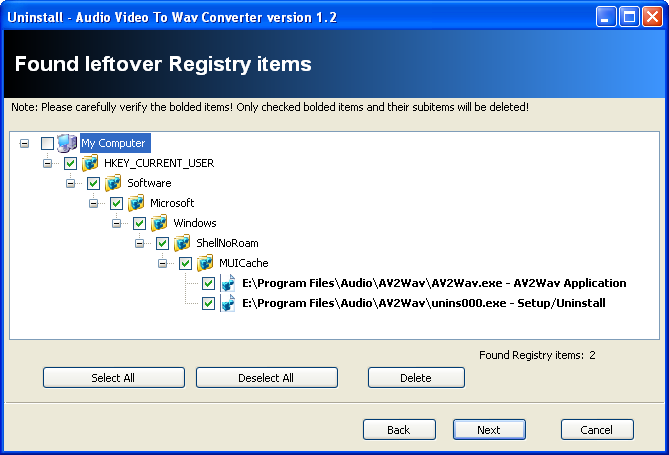
As for the info I quoted above, I installed and tried out the REVO uninstaller. Here's a screenshot from it's registry search.
I'll be trying this further.
Here's some info on one of the SP3 issues that's been reported. Seems it's because of HP's installation of XP and their using of the same image for both Intel and AMD computers. The article warns that other OEMs may also do this. http://www.osnews.com/story/19738
Atomm wrote:Awesome find Doc! Stuff like this really helps out at work when you have so many different customers running so many different configurations.
UPDATE: I started running multiple stress tests last week and found it failed once in a while with a rounding error. I started looking at the DIMM's first and discovered that one of them really didn't like slot 1 or 2 but was perfectly fine with slot 4! <---very odd
I tested and tested and retested and it's stable! (I even went back to the OC that I had with no problems) Besides updating the BIOS, fixing the boot problems that occured after the crashes and SP3; the old XP install is still intact and I"M BACK!!!
🔫 Look for the Judge to be crankin out bullets and death! Coming soon to friday's near you!! 🔫
Judge_Mental wrote:UPDATE: I started running multiple stress tests last week and found it failed once in a while with a rounding error. I started looking at the DIMM's first and discovered that one of them really didn't like slot 1 or 2 but was perfectly fine with slot 4! <---very odd
I tested and tested and retested and it's stable! (I even went back to the OC that I had with no problems) Besides updating the BIOS, fixing the boot problems that occured after the crashes and SP3; the old XP install is still intact and I"M BACK!!!
🔫 Look for the Judge to be crankin out bullets and death! Coming soon to friday's near you!! 🔫