Yup this wouldn't suprise me. I have a PS tester for this purpose. I would offer to ship it to you, but honestly you can buy them cheaper than our combined shipping, the offer still stands though.
PSU Issues
-
#1 -
#2 lexx wrote:http://www.cpuid.com/hwmonitor.php
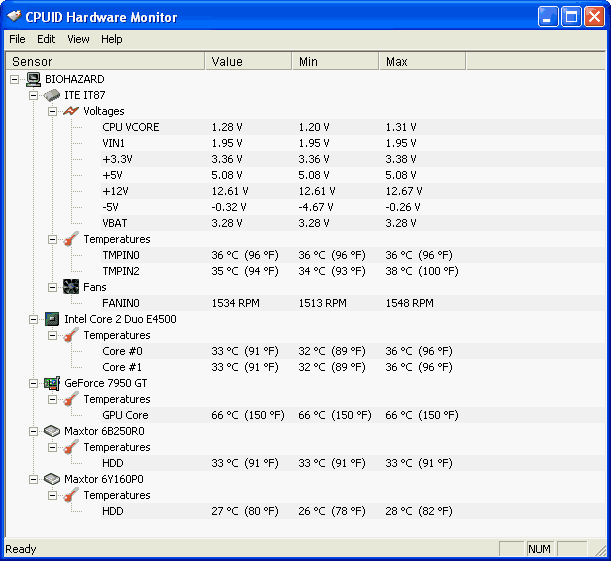
I installed pcalert4 that came with my MSI. Its beeping I only have 10.12v instead of twelve. Bios sez 12.07 v. So I downloaded this hwmonitor and it reports 10.12v.
Think this caused my video card issue? Crap, powersupply is only a couple of months old bought at CircuitCity.
Well, I don't really know WHAT problems you're having now. They're spread out over a few threads, and I'm not sure if you talking about problems you were having BEFORE you bought new parts or AFTER.
I wouldn't think too little voltage would cause overheating, but I could be wrong. I know enough to say it's NOT A GOOD THING, though.
Here's mine for comparison
-
#3 built in hardware monitors are not reliable. They are almost as accurate as you licking your finger, holding it up in the wind and giving me a weather forecast.
Lousy powersupplies are quite often the reason for computer issues especially machines that are pushed such as gaming rigs. -
#4 Its everything I just installed. I just put in a brand new 550w I had in the box, still reporting 10.03 volts for the 12v. Think I should re-install windows?
New moto, cpu, ram, and currently new pwrsupply w/7950 vid card.
Thanks Bubba. I think it has to be something else now. Bios reports 12+ volts with this one too. I should think the bios voltage should be the most reliable? -
#5 if it were running at 10v, that would be 20% off, that is a big issue.
Now it could be that the card has an issue so it has a larger resistance and thus more heat and less performance, or it could be that the card is being supplied with too little voltage. -
#6 Could I impose on a more experienced admin to move this page of msgs, maybe to this thread?
/forums/geeks-r-us/new-build-hiccops-5821/" target="_blank">/forums/geeks-r-us/new-build-hiccops-5821/
I don't want to delete them by accident.
We've kept this thread strictly for app recommendations up until this page, and then we went off-topic.
Thanks! -
#7 Done, you can take care of me via Paypal! :-) -
#8 Bubbaspanky wrote:Done, you can take care of me via Paypal! :-)
Ha, I would have done it but I didn't see where I could check and move, ie the checks wouldn't uncheck.
Anywho, I put the 700w ps in the other day, no change just as I thought. I'll try to get in a couple of games later this week and see if there is any change in the pause.
I'll probably put the 550w back in since I don't believe the UPS I have will hold the power for the 700w. I kinda like having that 10mins or so of battery just in case. -
#9 lexx wrote:Ha, I would have done it but I didn't see where I could check and move, ie the checks wouldn't uncheck.
Anywho, I put the 700w ps in the other day, no change just as I thought. I'll try to get in a couple of games later this week and see if there is any change in the pause.
I'll probably put the 550w back in since I don't believe the UPS I have will hold the power for the 700w. I kinda like having that 10mins or so of battery just in case.
What pause? This is the first time I'm hearing of a pause. We were talking about your power supply, and before that, your video card. Dude, you need to start dedicated threads for this stuff.
Defrag. Drivers.
Do the thing that reduces your PunkBuster checks(legal, not frowned upon by PB). This works in all PB games AFAIK. Definitely works in COD4 and BF2.Join a PunkBuster-enabled game server.
Open the console
Type "\pb_sleep 500" (tells punkbuster client software to wait longer before awakening and sending info to PB)
Type "\pb_writecfg" (makes the above setting permanent so you don't have to do it each time you log in)
The above changes the frequency that your PC reports to the server and thus reduced frequency of network spikes and the associated latency.
Similar problem to what you're having, and possible solutions:
http://forums.guru3d.com/showthread.php?threadid=243124
Bubba, regarding your Paypal money: I'd rather owe it to you than cheat you out of it. 🙂 -
#10 I'm good with that.
😛 -
#11 Na Doc, I've mentioned the pause before, more than once. I think it may be my ISP. While running that new Mohawk voice server on the side monitor, I noticed the ping indicator jumping from yellow to red. There is also wireless connections here.
I may put my AM2 back in place Friday just to be sure.
Thanks for the links, I'll check into them tomorrow nite. -
#12 lexx wrote:Na Doc, I've mentioned the pause before, more than once. I think it may be my ISP. While running that new Mohawk voice server on the side monitor, I noticed the ping indicator jumping from yellow to red. There is also wireless connections here.
I may put my AM2 back in place Friday just to be sure.
Thanks for the links, I'll check into them tomorrow nite.
That sounds like it's internet connection related for sure. What exactly it is, who knows? I know how much you love your ISP -
#13 DocJon wrote:That sounds like it's internet connection related for sure. What exactly it is, who knows? I know how much you love your ISP
I think it could be. Internet related. I was on your CGC Mohawk yday. And it was jumping too. From 406 to 203 ping.
Guessed it was normal. Taken the distance into account and lack of fiber optic cables. -
#14 lexx wrote:Anywho, I put the 700w ps in the other day, no change just as I thought. I'll try to get in a couple of games later this week and see if there is any change in the pause.
I'll probably put the 550w back in since I don't believe the UPS I have will hold the power for the 700w. I kinda like having that 10mins or so of battery just in case.
HUH????? What does the PS have to do with your UPS?? The PS wattage is the MAX it can handle, not the current it always draws. Your UPS will handle it just fine if you have the same set-up.
I would use the larger PS for two reasons. A) Future expandability. 😎 The higher wattage PS will have to work less giving you the power if your usage is not that bad. In other words if you use say 400 watts and have a 500 watt PS, it will be at 80% capacity. A 1000 watt one would only be at 40. it probably does not matter as they are built to handle it but it is always better to have a beefier one IMHO. -
#15 lexx wrote:Na Doc, I've mentioned the pause before, more than once. I think it may be my ISP. While running that new Mohawk voice server on the side monitor, I noticed the ping indicator jumping from yellow to red. There is also wireless connections here.
I may put my AM2 back in place Friday just to be sure.
Thanks for the links, I'll check into them tomorrow nite.
I have to ask. Is your wireless locked down man????? -
#16 Paladin wrote:I have to ask. Is your wireless locked down man?????
Yah, with password and the newer encryption. I have alot of close neighbors 🙂
My UPS is only rated 550w so how I understand, it will not stay powered. For ex, my server is running a 550w ps also but its only sitting on 400w UPS. When the power goes out it shuts down almost immediately.
Also according to that article Sarge found, your wasting alot of money at the socket once you get under 75% too much. If I need 400w a 550w ps fits quite well.
I'll probably just leave it @ 700w tho. Could add some more neon lights or something 😉 Nice new design on the molex connectors too although I only needed 2 or 3 of them. -
#17 saintchism wrote:I think it could be. Internet related. I was on your CGC Mohawk yday. And it was jumping too. From 406 to 203 ping.
Guessed it was normal. Taken the distance into account and lack of fiber optic cables.
Mohawk also has temp debugging code in it that is probably causing that. I read they are almost ready to finalize it to where it will be alot better than Ventrilo.
Without a status panel, I'm not too keen on it yet.